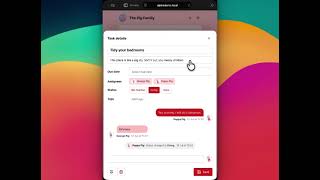
It took several years, and several prototypes to get Alpaca Issue Tracker built and launched. So task management was on my mind for quite a while. And as we made decisions which tailored the Alpaca experience for efficient business operation, I was aware of the small differences which could produce a very different user experience.
In a family of two self-employed parents and two college-age kids, there’s a lot to be done. We need a task management solution just as much as any business. But it needs to work and feel very different.
I tried all the existing options, but I didn’t like any of them. Then it dawned on me, that Alpaca got me most of the way towards building my own perfect solution.
A theme, not a plugin
Alpaca is intended to be installed within a website, to manage issues relating to that website. It makes sense for it to be a plugin, which adds extra management screens; and it needs its own (private) post and comment types.
Alpine works as a React-powered Single-Page Application, driven entirely by the WordPress REST API. It ships as a theme, with everything routed through the theme’s index.php. It isn’t shadowing an existing website, so we can keep things simple by using the default Post post type and Tag taxonomy.
Of course, this also means we have total responsibility for the front-end experience. Whereas Alpaca always tries to use WordPress’s own Gutenberg components, Alpine is free to look elsewhere: specifically, the MIT-licensed Chakra UI component library.
Alpine is designed primarily for smartphone use, and can be installed as a Progressive Web App. All necessary user account admin can be done in Alpine’s preferences popover, so the users should never know they’re using WordPress.
But under the hood, it’s still just WordPress. The site title, tagline, timezone etc – all are managed in the Settings area, in the usual way. There’s an Alpine Settings page under Appearance, to control things like user visibility and status order.
How I run it
Our family instance is running within a WordPress multisite I use for various personal and professional purposes – including the site you’re looking at right now.
Naturally, the site needs to be login-only. We’re all on Android phones, with a family domain on Google, so I installed a plugin to enable Google-based login. But you could just run it with normal WP accounts.
It’s designed with families in mind, so each user account has the ability to set a custom display name for use within the app – meaning I can be Dad in Alpine, but Simon on other sites.
Beyond the app experience
A family smartphone app is pretty cool. But some functions will always work better when delivered via other apps.
Alpine gives each user an iCal feed of tasks assigned to them which also have due-dates. This means they can see their upcoming deadlines as events in their smartphone’s calendar. Each feed is secured by a randomised API key, which can be rotated with a single click.
Alpine can also be extended via plugins, to add functionality to the core interface, or serve its core data for new channels.
For example, Telegram has been our preferred chat app for many years. I created a Telegram bot which not only sends notifications, to a given group chat or to individuals, but can also talk back to the Alpine API, allowing users to create, assign, update or comment on tasks without leaving Telegram.
It didn’t take long for other developers to express an interest in creating similar plugins, to work with other chat platforms. So I’ve tried to keep Alpine totally platform-agnostic, serving and processing raw data, and leaving output outside.
Feature comparison
Alpaca
Alpine
| Kanban columns based on Status | Status is just another taxonomy |
| Tasks can be sorted vertically for priority | Pinned tasks to indicate priority |
| Drag-and-drop within/between columns | Not applicable |
| Search works across post and comments | Same |
| Actions add comments automatically | Same |
| Built-in email notifications, scope for more | Nothing built-in, but extensible |
| Designed to match wp-admin | Choose a colour scheme, inc dark mode |